modules

sobota, 9 lutego 2013

Prestashop categories filter module - step by step


Prestashop Step by step - categories

As we said this module improves your shop Front - Office. With this module you can create a new category block exactly there where you want. Module supports three most important hooks - right column, left column and top section of your shop. But you can of course put it anywhere you want.


Main features of Step By Step categories tree filter module

Module creates a special block with categories tree filter
Module gives an ability for your customers to fast and reliable browse the categories tree
Module uses AJAX technique which mean that our addon loads categories tree without page refresh!

Module specification

Module allows you to select root category
Module allows you to setup the category tree depth
Module allows you to select place where you want to display categories block
You can select left column
You can select right column
You can select top section of your shop
You can also input categories block exactly there, where you want
You can personalize module by editing CSS styles - it's very simple and useful


more information about module you can find here: prestashop module filter category

Prestashop uploading files by customer to their orders


Prestashop module "Customer files upload" is an addon which provides your customers to add any file for their orders placed in your shop. You - as a shop administrator - are able to manage uploaded files in prestashop back office. You can download them into own hard disc drive, you can also delete them from server by one mouse click. Module is very useful both for customer and administrator.


Prestashop module "Customer Files Upload" main features:

For your shop customers:

  • Customers can upload image files to their order placed in your shop
  • Customers can manage own files
  • Customers can upload any file from own hard disc drive
  • Customers can add own file title
  • Customers can add own file description


For shop administrator

  • Shop administrator is able to manage uploaded files exactly from order list
  • Shop administrator has got access to latest files uploaded by customers
  • Shop administrator is able to download any file uploaded by customer
  • Shop administrator is able to delete any file uploaded by customer
  • Shop administrator has got an access to file name
  • Shop administrator has got an access to file description


piątek, 1 lutego 2013

Prestashop Facebook Shop tab examples of usage

We want to show you how you can configure module Facebook Shop for Prestashop . In this article you can see examples of usage. What is Facebook Shop for Prestashop module?  Facebook Shop module is the best way to create own PrestaShop store on Facebook. This module integrates your fanpage on Facebook with your shop based on PrestaShop engine in all available versions! Facebook Shop is a new, professional sales channel for distributing your stuff in social media networks. Our attractive tool that provides you shop for people with an account on Facebook will increase your income and increase consumer loyalty to your brand.

Examples of Facebook Shop for PrestaShop
 

click on image above to display shop on facebook. This is only several examples. More will be available soon!


piątek, 12 października 2012

Prestashop and facebook integration: shop in facebook fanpage tab

Today i want to write about presta and fcb integration module, and how to add own shop to our facebook fanpage!

Facebook Shop module for PrestaShop is the best and the most effective PrestaShop module, for integrate your shop with your Facebook Fanpage. This solution is not only a module but also a reliable application on Facebook that allows you to easily install the shop tab! In this way you will not have to create a new application. Just click, and use this great social media tool.


PrestaShop facebook shop tab

you can check demo version of this module, and you will se how does this feature work"


środa, 10 października 2012

How to turn on error reporting in PrestShop ?

This article is copied from: How to turn on error log / error reporting in PrestaShop ?

In this article you will read something about debuging modules and other shop problems. This article should be taken as an introduction to self-troubleshooting in the own store. This tutorial works in all versions of prestashop, in 1.5 too.

Turning error reporting on in PrestaShop:

By default, in PrestaShop this feature is disabled for safety reasons. Here is how to turn on PHP errors in shops based on PrestaShop:


Open and edit config.inc.php file

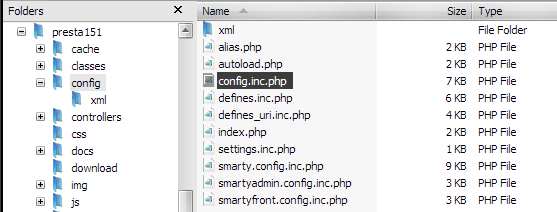
You first need to find the config.inc.php file in directory config in your main prestashop dir, exactly as we show on image below:


you must open this file and edit one setting parameter:

@ini_set('display_errors', 'off');

As you probably see and as we say, the display_errors value is set to off by default. You must turn it on. How to do that? just change it to:

@ini_set('display_errors', 'E_ALL');

and save the config.inc.php file. Thats all!


Did you know that display_errors parameter can have other values? Read more in official article about turning on error reporting in prestashop


środa, 19 września 2012

How to input html, css, javascript code into my PrestaShop site?

In this article i will write about adding html, css, javascript and other "client side" code into any place in our shop. Of course you can do it manually by editing template .tpl files of your shop theme. However, this method can be a bit annoying and difficult for users without a basic knowledge of programming languages ​​and smarty. In this short article i want to describe free module for adding html, css, javascript code in Prestashop.


Module is called HTML BOX and you can download it for free from MyPresta.eu website
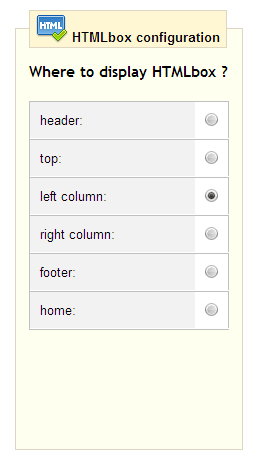
Usage of this module is very simple. Just download and install this module in your prestashop back office. Then you must go to configuration site of this module and select place, where you want to input html, css, javascript, other code. Exactly as we checked on image attached below:

Html box configuration

as you see, you can check one position from many front-office hook list.
  • You can display your code in:
  • Header section of your shop
  • Top section of your shop
  • Left collumn of your shop
  • Right collumn of your shop
  • footer section of your shop
  • and home section of your shop

We checked left collumn. 


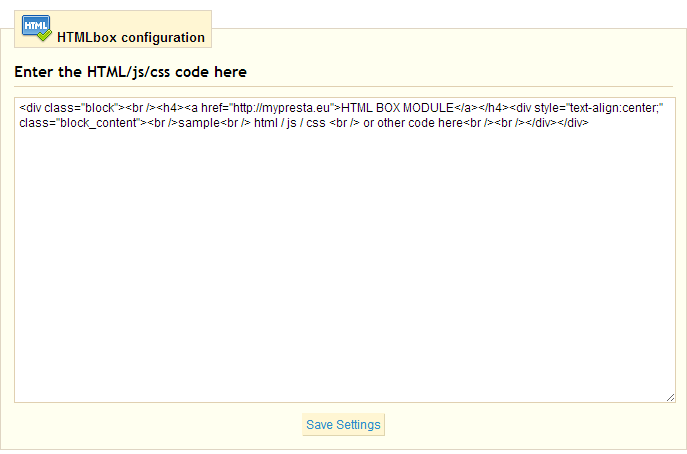
Text box window near hook list is place, where you put the code you want to dispaly. It could be any widget from other sites such like facebook, twitter, pinterest etc. So, put the code there and save settings of this module. Now you can refresh your shop page. You will see the new code exactly there, where you want and checked in module options.


niedziela, 16 września 2012

Prestashop 1.5 is now available!


Prestashop 1.5 new features

Multistore management
  • With options for multiple currencies, multiple languages and multiple domains, multistore management is complete, efficient and integrated into PrestaShop v1.5.  This new feature will allow any merchant, regardless of business size, to manage multiple stores from a single Back Office.
Cart-pricing rules
  • PrestaShop v1.5 allows you to manage your cart’s pricing rules easily through an ergonomic interface. Additionally, merchants can now provide discounts on any and all items in a customers’ cart. This feature provides an overtly-efficient way to market promotional offers upon checkout.
New modules API
  • For new APIs, the structure has been revised to help you simply and efficiently manage updates to all of your modules. The APIs will now automatically check to ensure you always have the latest version(s) of each module installed into your Back Office.
Rewritten Core
  • PrestaShop’s core software has been rewritten to meet the MVC pattern and the object paradigm. This will make it even easier for all developers using PrestaShop.
Redesigned Back Office
  • With an improved ergonomic Back Office and an updated graphical layout, PrestaShop’s new Back Office design is visually stunning and very easy to use. The redesign respects the MVC pattern to allow developers to quickly make customizations, if needed.

(Check out the new Back Office design)
Editing commands in Back Office
  • The editing commands in the Back Office have been optimized and relaxed. You will now be able to modify customers’ shopping carts as well as products already ordered. You will also be able to place orders from the back office, allowing you to help customers make purchases on your site (i.e. when they contact you by phone).
Improved Front Office Design and Functionality
  • The customer experience has been improved, including the order and checkout processes.  Merchants will now also be able to offer comprehensive product descriptions on a homepage that has been reimagined, and rebuilt from the ground up.

(New default template)
Improved After-Sales Service                                           
  • The integrated customer service feature has been greatly improved to centralize all of your customers’ messages from multiple sources. This new feature allows you to sync all of your email accounts so you can view and send messages directly from your Back Office.
Improved inventory management, supply orders, product returns and partial deliveries
  • For greater efficiency, PrestaShop will now include an inventory management tool allowing you to discern your physical stock from available quantities. In v1.5, you will now be able to manage your inventory in various warehouses, generate supply orders and view your stock through clear and specific interfaces. This inventory management tool is natively compatible with the new multistore feature, so managing your entire catalog of products has never been easier. Finally, for flexibility in managing customer orders, partial deliveries will now be available.
Improved management of downloadable products                
  • We have made selling downloadable products (photos, music, computer files, etc…) easier. You will now be able to manage product variations and create packages of multiple downloadable products. The file upload process has also improved.
In addition to the features provided above, multiple delivery addresses are now available. This way, if a customer chooses to shop for Christmas, or some other big event, they can buy multiple products at once and ship them individually to family and friends all over the world.
Several new partner modules have also been added as native features inside PrestaShop v1.5′s source code.